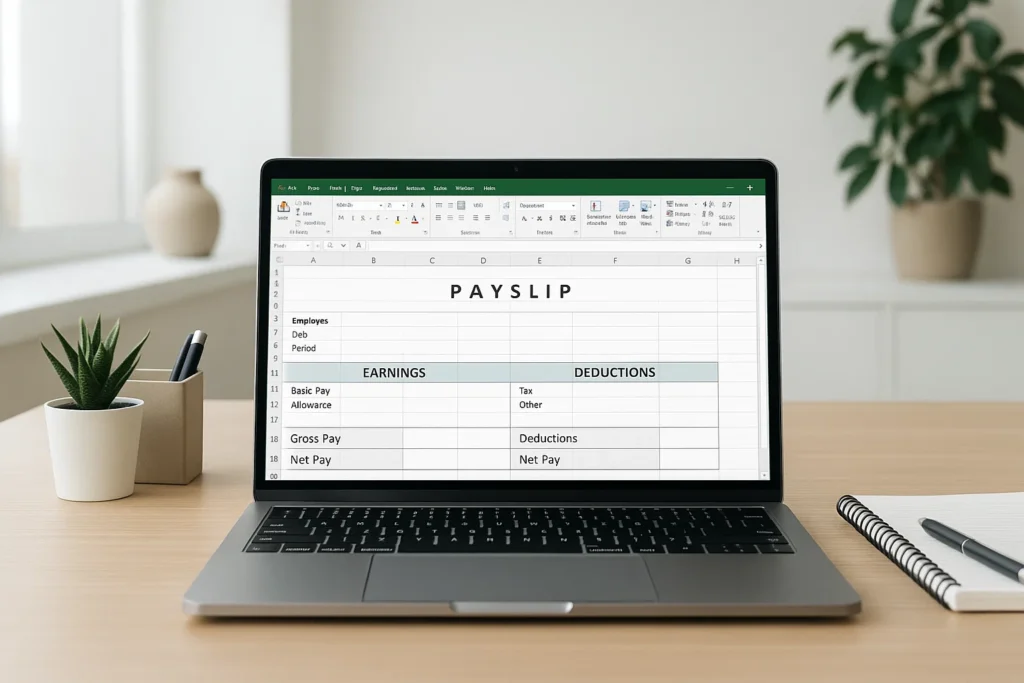
Let me explain why this matters. In many workplaces across the Philippines, employees still receive handwritten salary slips or screenshots from payroll apps. While these are helpful, they’re not always clear, and sometimes they don’t show everything an employee needs to understand their pay. An Excel payslip solves that problem. It’s neat, editable, and you can update it every month without starting from scratch.
Here’s what we’re going to explore: how a payslip works, what information must be included, how to build your own salary slip template, and how to download simple templates if you’re in a hurry. I’ll also share an Australian-style format because many Filipino learners work with global payroll systems. By the end, you’ll know how to design a professional payslip even if you’re new to Excel.
What a Payslip Really Shows
Before we jump into Excel, it’s important to understand the heart of a payslip. A payslip is more than just numbers. It tells a story your work hours, your deductions, your taxes, and your net salary.
In simple terms:
A payslip is a document given to an employee that explains
how their salary was calculated for a specific month.
Most payslips include:
- Employee details (name, ID, position)
- Employer details (company name, address)
- Pay period
- Basic salary
- Allowances
- Overtime
- Deductions like SSS, PhilHealth, Pag-IBIG, tax
- Net salary
When these details are placed neatly inside an Excel table, everything becomes easier to read and update.
Let’s break it down the way HR staff, small business owners, and students need to see it.
Why Use Excel for Payslips?
Excel is one of the most flexible tools you can use for payroll. You don’t need expensive software, and you can change the format anytime.
Here’s what matters:
Easy to Customize
You can add rows, change labels, highlight totals, and apply formulas without limits.
Free to Use
Most Filipino students and small businesses already have Excel or Google Sheets.
Allows Formulas
When you enter formulas correctly, the payslip calculates itself every month.
Professional Look
Even simple Excel tables look clean when printed as a PDF.
Copy-and-Paste Ready
Once you build a template, you only replace employee details each month.
With these advantages, it’s no surprise that terms like:
- simple salary slip format in excel free download
- payslip template free download
- simple salary slip format in word
are some of the most searched payroll phrases in the Philippines.
Key Parts of a Payslip Format in Excel
Let’s go through the parts you must include. Think of this like a checklist you can use while preparing your own sheet.
Employee Information Section
This goes at the top.
| Field | Example |
|---|---|
| Employee Name | John dela Cruz |
| Employee ID | 2025-008 |
| Department | Accounting |
| Position | Payroll Assistant |
Adding this section helps avoid mix-ups, especially if you manage many employees.
Company Information Section
This can be as simple as:
- Company Name
- Address
- Contact Number
- Logo (optional)
Some small businesses also add a signature line for the HR officer.
Salary Breakdown
Here’s where Excel truly shines. Each amount gets its own row.
| Component | Description | Example |
|---|---|---|
| Basic Salary | Monthly fixed pay | ₱20,000 |
| Allowances | Transport, meal, etc. | ₱2,000 |
| Overtime | Rate × hours | ₱1,500 |
| Holiday Pay | Special or regular holidays | ₱500 |
You can use formulas like:
This keeps your sheet organized.
Deductions
For a typical Filipino employee, these may include:
- SSS
- PhilHealth
- Pag-IBIG
- Withholding tax
- Cash advances (if any)
Example:
| Deduction | Amount |
|---|---|
| SSS | ₱900 |
| PhilHealth | ₱450 |
| Pag-IBIG | ₱100 |
| Tax | ₱1,200 |
With formulas, you can let Excel compute the total automatically.
Net Salary
This is the amount paid to the employee after deductions.
Excel formula example:
This should be bold so it stands out in the printed payslip.
How to Create a Payslip Format in Excel (Step-by-Step Guide)
Let’s build one together. Imagine you’re a student preparing a practice payroll sheet, or maybe you’re running a small sari-sari store and want to give proper payslips to your helper. Here’s the simplest way to start.
1. Open a Blank Excel Sheet
Keep it clean. No need for colors yet.
2. Create Three Main Sections
- Employee details
- Earnings
- Deductions
You can do this using borders so it’s easy to see.
3. Input Field Labels
Examples:
- Employee Name
- Month & Year
- Basic Salary
- Total Earnings
- Total Deductions
- Net Salary
Tip: Use bold for labels.
4. Add Formulas
This is where Excel helps you save time.
Example:
This adds up all earning components.
This adds all deductions.
This gives you the net pay.
5. Format the Numbers
Highlight salary amounts, right-click → Format Cells → Currency.
Choose ₱ for Philippine Peso.
6. Apply Borders and Shading
A payslip looks more professional when:
- Earnings and deductions are separated
- Net salary is highlighted
- Header is shaded lightly
Use soft gray never dark colors because payslips should be easy to print.
7. Save as Template
Save your file as:
Now you can reuse it every month.
Free Payslip Format in Excel (Simple Layout Example)
Below is a sample format you can recreate:
SAMPLE PAYSLIP TEMPLATE
Company Name Here
Company Address
Employee Details
| Field | Value |
|---|---|
| Employee Name | |
| Employee ID | |
| Pay Period |
Earnings
| Description | Amount |
|---|---|
| Basic Salary | |
| Allowances | |
| Overtime | |
| Others | |
| Total Earnings | =SUM(B6:B9) |
Deductions
| Description | Amount |
|---|---|
| SSS | |
| PhilHealth | |
| Pag-IBIG | |
| Tax | |
| Others | |
| Total Deductions | =SUM(B13:B17) |
Net Salary
=B10 – B18
Simple Salary Slip Format in Word
Many businesses still ask: “Can we make a payslip in Word instead?”
Yes but Word does not calculate. It only displays.
Use Word if:
- You print payslips manually
- You want a clean printable document
- You don’t need formulas
Use Excel if:
- You want automatic calculation
- Multiple employees
- You need fast updates
Most HR teams prefer Excel.
Australian Payslip Template in Excel
Australian payroll has different requirements, including:
- Superannuation
- Tax File Number (TFN)
- Award rates
- Pay rate per hour
- Leave balances
A typical Australian payslip format includes:
Employee Details
- Name
- TFN
- Hourly rate
- Hours worked
Earnings
- Ordinary hours
- Overtime
- Penalty rates
Deductions
- Tax
- Super
- Union fees
Filipino workers applying in Australia or studying payroll internationally usually practice with this format. It helps build confidence in handling foreign payroll systems.
Why Students Should Learn Payslip Formatting
Understanding payslips builds important skills:
1. Financial Awareness
You learn how your salary is computed.
2. Workplace Readiness
Almost all jobs require basic payroll knowledge.
3. Excel Skills
You practice formulas, formatting, and data management.
4. Research and Thesis Skills
Since Liam Brown specializes in research, this part matters. Learning how to read salary breakdowns helps you analyze information clearly a skill useful in school projects, thesis writing, and real work.
Mini Story: How Excel Helped One Small Shop Owner
Let me share a relatable moment.
A small computer shop owner in Quezon City struggled every month preparing handwritten payslips for his two helpers. He often forgot deductions, rates, or overtime hours. One day, his niece a senior high school student created a simple payslip format in Excel for him. She added formulas, borders, and color coding.
The next payday, the shop owner smiled.
“Mas malinaw pala ‘to,” he said. Clearer indeed and faster.
His helpers appreciated it, and he finally felt confident about managing his payroll.
Sometimes the simplest tools create the biggest relief.
Tips for Making a Professional Payslip
Here are a few simple improvements you can add:
Use consistent fonts
Calibri or Arial look clean.
Align numbers to the right
Salary amounts should be easy to compare.
Highlight Net Salary
Use light yellow to make it stand out.
Add company logo
In the header, insert → picture.
Protect the sheet
Review → Protect Sheet
This prevents accidental formula deletion.
Checklist Before Printing Your Payslip
- Check all formulas
- Confirm correct pay period
- Verify deduction values
- Ensure formatting is consistent
- Preview before printing (Ctrl+F2)
This keeps errors away.
Frequently Asked Questions:
1. Can I download a ready-made payslip format in Excel?
Yes, many free templates exist online, but creating your own helps ensure accuracy.
2. Is Excel better than Word for payslips?
Excel is better because it calculates automatically.
3. Can small businesses use Excel instead of payroll software?
Yes. Many small shops, tutors, private schools, and freelancers use Excel templates.
4. Can I print Excel payslips?
Yes adjust Print Area and Page Setup for a clean look.
5. Can students use this guide for school projects?
Absolutely. It’s perfect for business math, accounting, and computer literacy subjects.
Final Takeaway
Think of a payslip format in Excel as a small but powerful tool. It keeps your salary records clear, protects employee rights, and helps businesses stay organized. With a little practice, you can build templates that look professional and compute everything for you. Whether you’re a student learning Excel, an employee checking your deductions, or a small business owner running payroll, this guide gives you a practical and confidence-building start.
Learning tools like this may feel small, but they strengthen your skills for school, work, and financial life. Keep practicing you’ll get better with every sheet you create.

Liam Brown guides students in research, thesis writing, and vocabulary. With clear step-by-step advice, he empowers learners to build strong academic and lifelong study skills.